Build the plan once. Send it on WhatsApp.
Build weeks, sessions and exercises with sets, reps, load and rest. Send a session now, schedule it, or send the whole week. Clients follow the plan on a private link. They install nothing.
How a plan reaches your client
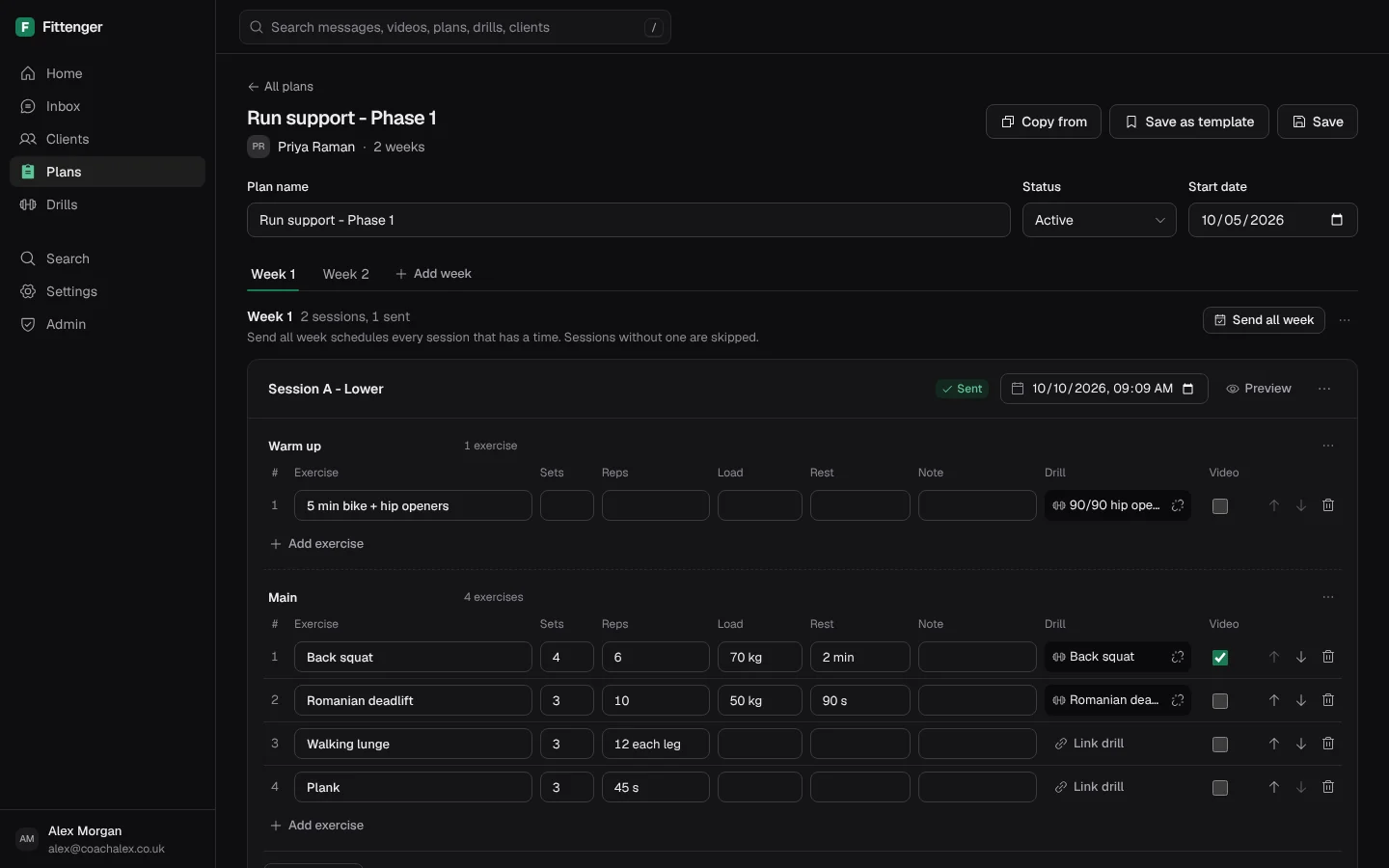
Build the weeks and sessions
Make a plan for the client and add a week. Add sessions, then add exercises with sets, reps, load and rest.
Send or schedule each session
Press Send now for one session, or set its time. Send all week sends every session that has a time. Sessions with no time are skipped.
The client opens the plan link
Choose Plan link in the client's chat. The client opens the whole plan on a private link. They tap Done as planned, or change only what was different.
Programmes, results and changes
A programme library
Import a programme from a Google Sheets link, an Excel file or a CSV. Its days, weeks and blocks go into your Library. Assign them to any client.
Changes you check first
When the sheet changes, Fittenger lists each change. Nothing changes until you choose Apply changes. A session you already sent never changes.
Planned and done, side by side
Clients log by exception. Choose Results on a session to see what was planned and what was done. A session with no reply is never counted as done.
Plain answers.
Do clients need an app to see their plan?
No. The plan opens on the phone from a private link, with no login. The link works for 90 days. You can turn off older links.
Can I reuse a plan for another client?
Yes. Choose Save as template to keep a plan's weeks and sessions. Choose Copy from to start a new plan from another one.
What if a client changes a logged result?
The client can change a result for 7 days. You can change that time in Coaching settings. After that, the result is locked for the client. You can still change or delete any result.
What happens after 24 hours without a reply?
WhatsApp allows only an approved template message first. Fittenger sends that short prompt, and the plan goes out when the client replies. Meta charges your WhatsApp account for each template message. Replies inside the 24-hour window are free. See Meta’s price list.
More of the desk.
Inbox
Every client chat on one screen, with unread counts and form videos.
Tracking
Weight, sleep and steps from check-in replies, checked by you.
Drills
Your own exercise demos, tagged and sent on WhatsApp in one step.
Calendar
A booking link for clients, free times only, and busy times from your calendars.
Search
One search box for messages, videos, plans, drills and clients.

Coach them where they already chat.
Claim a place£10 a month for the first 50 coaches. Then £15. Clients pay nothing.